
If you've received an invitation email from nudge@larky.com entitled "You're invited to join nudge!", a member of your team has added you to nudge® platform. Your first step to gain access is to create some login credentials so you can get started.
If you haven't yet been added and don't have the email, someone who currently has access can easily invite you. If there are any questions about who is inviting whom, please reach out to support@larky.com.
Step 1: Click the link in the welcome email
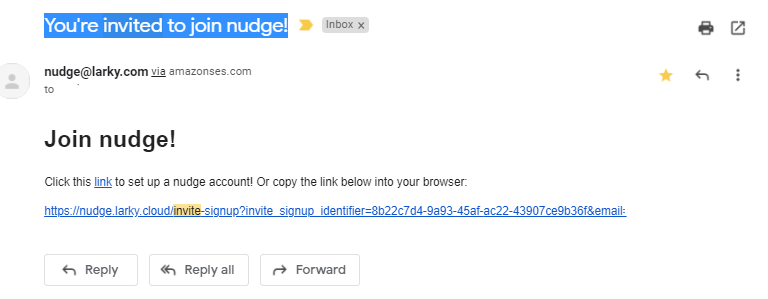
Click the link in the email to continue. If for some reason you can't click the link, you can copy the full link and paste it into your browser.
Step 2: Enter your name and select a password
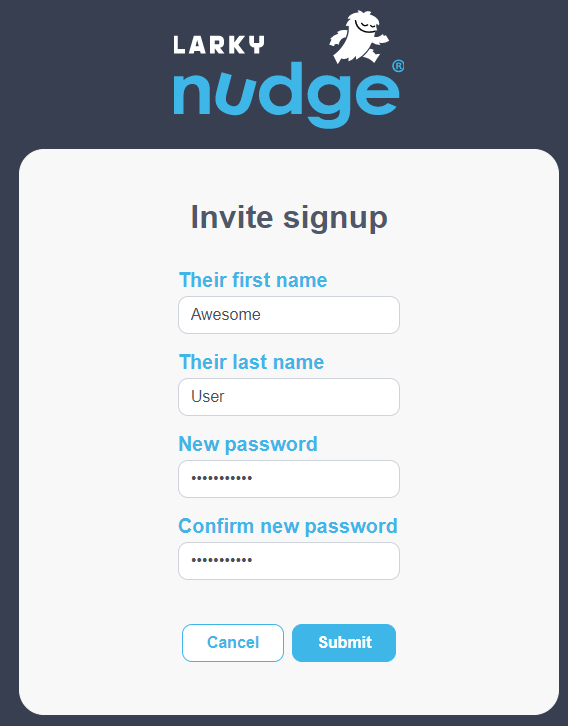
We encourage you to use a password that meets current standards for length and complexity. If you forget the password, there is a password reset link on the login page that will direct you through the process of setting a replacement password.
Click the Submit button to set your new login information, and take you to the login page to get started.
We're here to help!
Have questions? Just reach out to us through the Submit a request link above, or email us at support@larky.com.
Comments
0 comments
Please sign in to leave a comment.